

blobhub, a single binary that authenticates against BlobHub, addresses your orgs, blobs
and revisions, and works with what those revisions contain — from a terminal or from CI.
Its commands are grouped by blob type — a dotted string such as blobhub.compute.workflow, one per blob,
which is the axis the platform itself extends along. Authentication, profiles, blob inspection and output
formatting are shared by everything; everything else lives in a command group named after a blob type —
workflow and scheduler today.
The CLI introduces no new BlobHub backend endpoints — every command speaks the existing BlobHub REST API as
the user whose API key it carries.
Why the CLI exists
A workflow definition’slogic.code component normally has its code typed into a textarea in the visual editor.
Code that lives there cannot be imported, unit-tested, linted, reviewed in a pull request, or version-controlled.
The workflow command group closes that gap. You keep the code as an ordinary Python package — modules,
subpackages, local imports, a test suite — and the CLI compiles it into the flat, import-less namespace the
platform’s sandbox actually executes. That compilation is deterministic, so the code in your repository and the
code on the revision are the same code, and a rebuild over unchanged sources leaves git status clean.
Install
blobhub-cli; the binary it installs is blobhub.
To upgrade later:
Quickstart
logic.code
component (id: c1) is compiled from the Python package under pkg/:
definitions/checkout_flow.json is the definition document itself. Write it by hand, or run
blobhub workflow pull -f manifest.yaml to fetch what is already on the revision.
In CI, skip the credentials file entirely: set BLOBHUB_API_KEY, and BLOBHUB_API_URL if you are not pointing
at the default. A key from the environment works with no credentials file present at all. The other option is
to script blobhub login itself — --api-key-stdin plus --no-input stores a
validated profile with no terminal involved — which earns its place when you want a named, stored identity
rather than a key living only in one process’s environment.
What a deploy looks like
blobhub workflow diff reports what a deploy would change: which definitions are present on each side, what
moved in their topology and their code, and whether a code port was edited in the visual editor since the last
build. It writes nothing. blobhub workflow deploy then performs it — compile, upload only the definitions whose
document actually changed, and run the platform’s own check against each workflow definition it uploaded.
When compilation fails, it fails before anything is uploaded, and the error names both the code and the module
it could not resolve. Every failure the CLI reports carries an error code, usually with a hint naming the way
out; the codes are catalogued in Error codes.
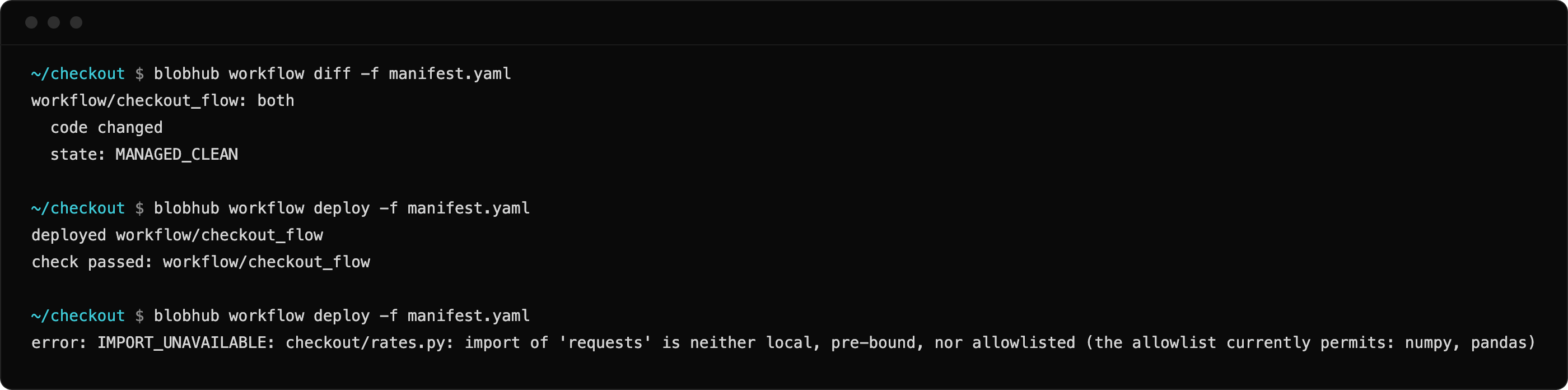
diff reports the change, deploy applies and checks it — a later deploy refuses an unavailable import.
What’s in this section
The pages are organized the way the binary is: what is shared comes first, then one group per blob type. The Overview group covers everything not tied to a kind of blob:- Concepts — the mental model: shared versus blob-type commands, what a manifest describes, the verbatim/compiled split, and the platform behaviours that shape every command.
- Authentication —
login,logout,whoami, andprofile ls/profile use. - Utilities —
doctor, the preflight to reach for when another command fails, andcompletion. - Blob —
blob show,blob revisionsandblob limits, which answer “what am I pointing at, and may I write to it?” for a blob of any type. - Configuration — the credentials file, the precedence ladder, the global flags, output
streams, exit codes and the
--jsonenvelope. - Error codes — the full catalog: what each code means and how to resolve it.
blobhub.compute.workflow: an overview of the deployment
lifecycle, one page per command, and three references — the manifest format, the compiler contract, and what
the logic.code sandbox binds.
The Scheduler group covers blobs of type blobhub.compute.scheduler and
is structurally identical: an overview, one page per command, and the scheduler manifest reference.
A new blob type arrives as one more group, without changing anything above it.