

job_type that decides how the worker handles it.
The worker introduces no new BlobHub backend endpoints — every job type speaks the existing
BlobHub REST and WebSocket APIs as the user whose API key the worker carries.
Install
The agent CLIs are separate
The worker drives coding agents; it does not ship them. Asession_agent_harness section needs the CLI
for whichever agent.type its threads use already installed on the host
and already signed in:
The worker checks only that the command resolves on
PATH. A missing one fails the thread with
AGENT_EXECUTABLE_NOT_FOUND; an installed-but-unauthenticated one passes that check and then stalls the
turn instead — see
Session Agent Harness → Reference.
Quickstart
name and a job_type, plus whatever
fields that job type requires. The Configuration page is the complete
config.yaml reference.
The live dashboard
Runblobhub-worker start --tui for a live, read-only view of every section and thread. The dashboard
reflects what the worker is doing — you drive threads from the BlobHub web UI, not from here.
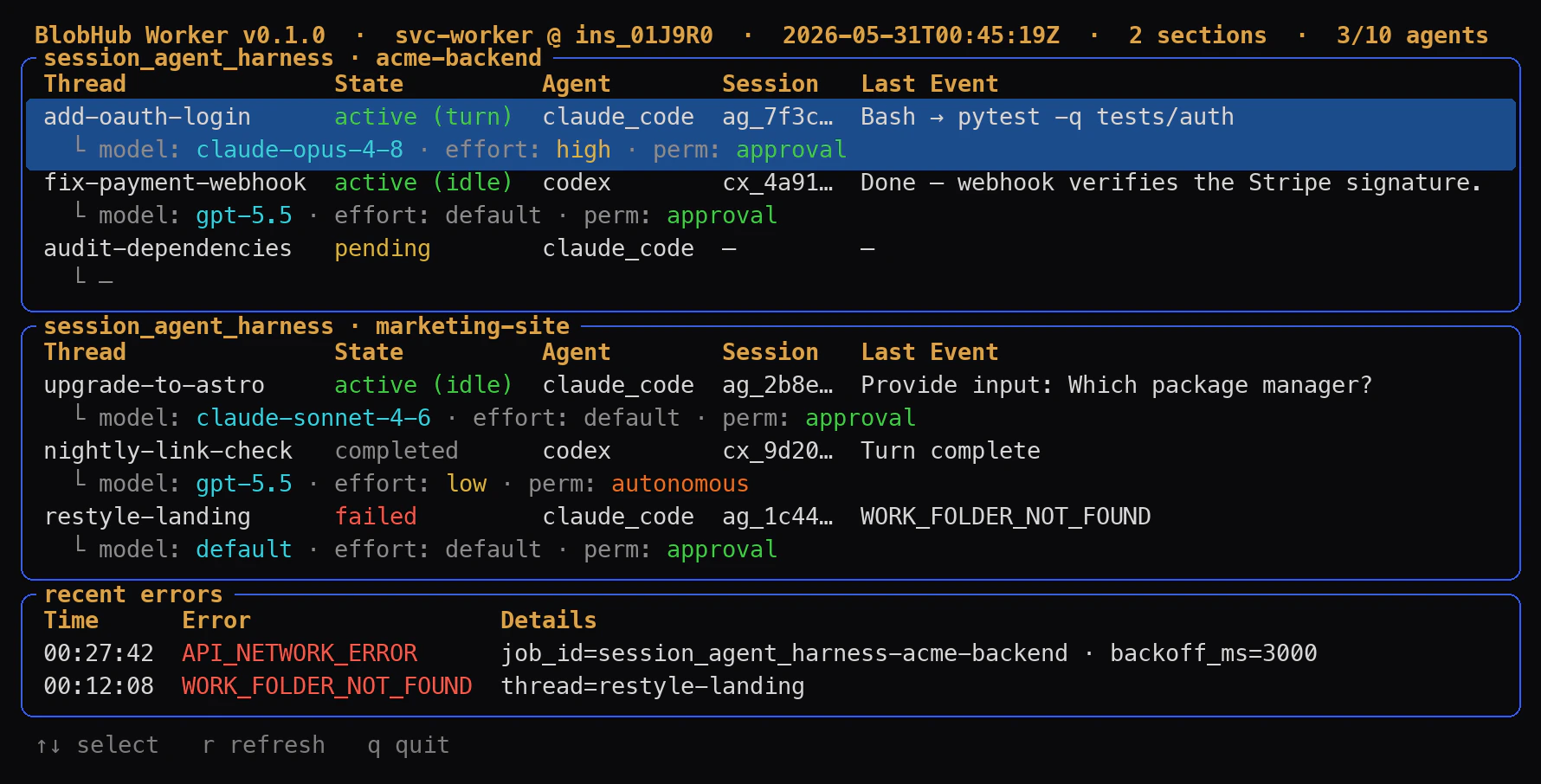
The --tui dashboard — one panel per section, plus a recent-errors strip.
- The header shows the worker version, the user it acts as, the instance id, the clock, and how
many agent slots are busy (
3/10 agents). - Each section is its own panel titled
session_agent_harness · <name>, listing its threads withState,Agent, the resumableSessionid, and theLast Event. The└line shows the resolvedmodel · effort · perm; the selected thread is highlighted. - State is color-coded live:
active (turn)/active (idle)green,pendingyellow,completeddim,failedred. - recent errors collects the latest warnings and failures. Press
qfor a graceful shutdown.
What’s in this section
The pages in Overview describe the worker as a product, independent of any specific job type:- Concepts — the mental model: process, sections, job types, sessions, threads, and agents.
blobhub-worker login,blobhub-worker start— CLI reference.- Configuration — the complete
config.yamlyou write. - Reference — process-level exit codes and generic limitations.